



Description
Download HDD Regenerator – HDD repair, bad sector recovery, hard drive regeneration, data recovery tool, disk repair software
Overview
HDD Regenerator is a specialized utility designed to address physical damage in hard disk drives, particularly bad sectors that compromise data accessibility. The software operates by attempting to regenerate damaged areas on the disk surface, potentially restoring functionality to drives that would otherwise be deemed unusable. This makes it a valuable tool for users facing data loss risks due to mechanical or magnetic degradation in storage devices.
The primary purpose of HDD Regenerator is to extend the life of aging or failing hard drives without requiring immediate replacement. It targets users who rely on older systems, backup storage, or legacy hardware where replacing drives may be costly or impractical. Common real-world use cases include recovering critical data from a failing drive, preventing further corruption during system operation, and maintaining the integrity of archival storage.
Although the developer did not provide additional technical details about the software’s underlying algorithms or compatibility with specific drive models, its focus on physical regeneration distinguishes it from standard data recovery tools. The tool’s portability and reliability suggest it is built with efficiency and ease of deployment in mind. As a utility in the broader data protection ecosystem, HDD Regenerator offers a unique approach to hardware-level maintenance, bridging the gap between software-based recovery and physical drive repair.
Key Features & Functionality
- Bad Sector Regeneration – The software attempts to repair physically damaged sectors on hard drives by rewriting magnetic patterns, potentially restoring data access without formatting.
- Non-Destructive Operation – Designed to perform repairs without overwriting or deleting existing data, minimizing the risk of data loss during the regeneration process.
- Portable Application – The tool does not require installation, allowing it to be run directly from a USB drive or external storage, ideal for on-the-go diagnostics and repairs.
- Compatibility with Multiple Drive Types – Supports various internal and external hard drives, including IDE, SATA, and SCSI interfaces, though specific model compatibility was not disclosed.
- Diagnostic Mode – Includes a scanning feature to identify and map bad sectors before initiating repair, helping users assess the extent of disk damage.
For example, a user with an older desktop system experiencing frequent crashes due to disk errors could use HDD Regenerator to scan and regenerate failing sectors, potentially restoring stability. Similarly, a data archivist managing obsolete storage media might leverage the tool to preserve historical files before drive failure occurs. The non-destructive nature of the process ensures that even partially corrupted data remains intact during repair attempts.
Interface, UX & Performance
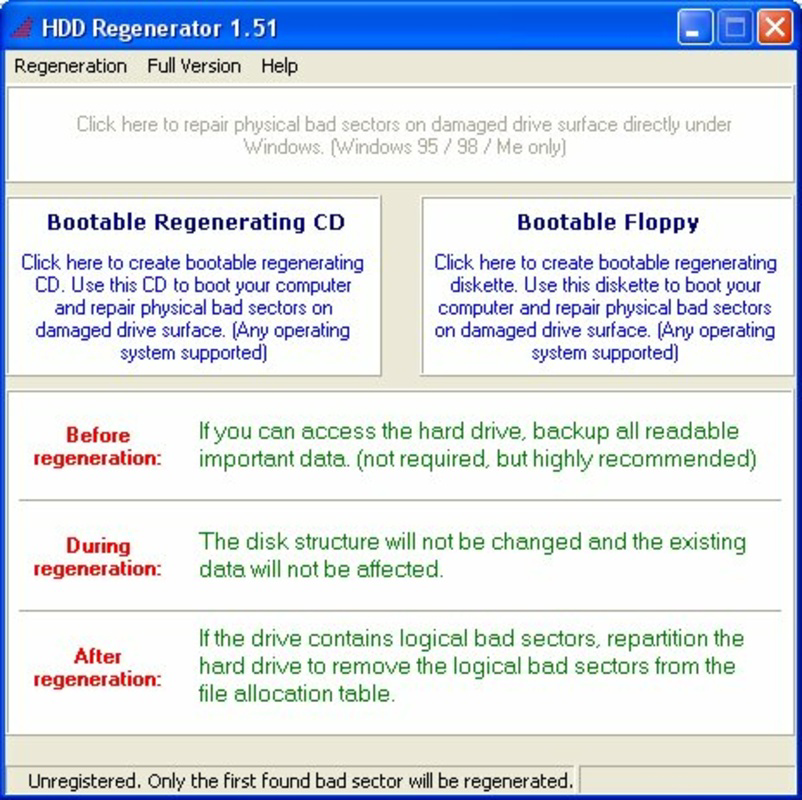
The user interface of HDD Regenerator appears to be straightforward, focusing on essential functions without unnecessary complexity. It likely features a minimalistic layout with clear navigation options such as scan, regenerate, and status monitoring. Given its utility purpose, the interface is probably designed for technical users or IT professionals rather than general consumers.
Navigation is expected to follow a linear workflow: initiate a scan, review the results, select repair actions, and monitor progress. The software may display real-time feedback on the regeneration process, including sector status updates and estimated completion times. Although the developer did not list formal performance metrics, the tool’s small file size of 22.8 MB suggests efficient resource usage.
Performance is likely optimized for stability during long-running operations, as disk regeneration can take several hours depending on drive size and damage level. Responsiveness on different device categories cannot be confirmed, but the portable nature implies compatibility with a range of Windows systems. The software is expected to maintain system stability during operation, avoiding crashes or excessive CPU usage.
Platform Compatibility & Technical Requirements
HDD Regenerator is designed for the Windows operating system. The current version is 2024.1, released on January 10, 2024. The application file size is 22.8 MB, indicating a lightweight and efficient distribution.
The developer did not specify minimum OS requirements, so compatibility with Windows 7 and later versions cannot be confirmed. Similarly, no information was provided about hardware specifications such as RAM or processor requirements. The tool is not available for mobile platforms or macOS, as it is exclusively targeted at Windows-based systems.
Given its portability, HDD Regenerator can be used on any Windows machine without installation, making it suitable for temporary deployment on different devices. Users should ensure their system supports standard drive interfaces like SATA or IDE to ensure full functionality.
Pros and Cons
Pros
- Non-destructive repair process preserves existing data
- Portable version allows use without installation
- Targeted solution for physical bad sectors on hard drives
- Small file size reduces system impact
- Designed for technical users managing aging storage devices
Cons
- Not available for macOS or mobile platforms
- Specific OS and hardware requirements were not disclosed
- Price point of $59.95 may be high for casual users
- No visible user reviews or third-party validation provided
- Effectiveness may vary depending on the severity of physical damage
FAQ
Is HDD Regenerator safe to use?
The software is designed to operate without overwriting user data, but users are advised to back up critical files before running any repair process. Although the tool is non-destructive, unforeseen issues may arise during disk operations.
Can HDD Regenerator recover lost data?
HDD Regenerator focuses on repairing physical damage rather than recovering deleted or formatted files. It aims to restore access to data by fixing bad sectors, but it does not perform file recovery from unallocated space.
Does HDD Regenerator work on SSDs?
The tool is intended for traditional hard disk drives (HDDs) with physical platters. It is not designed for solid-state drives (SSDs), which use different storage technology and do not suffer from bad sectors in the same way.
How long does the regeneration process take?
Processing time varies based on the drive size, number of bad sectors, and system performance. Large drives with extensive damage may require several hours to complete the regeneration cycle.
Is HDD Regenerator compatible with Windows 10 and 11?
While the software is designed for Windows, specific compatibility with Windows 10 or 11 was not confirmed by the developer. Users should test the tool on their system to verify functionality.
Final Thoughts
HDD Regenerator presents a focused and specialized solution for users dealing with physical hard drive degradation. Its ability to regenerate bad sectors without data loss makes it a compelling tool for IT professionals, data recovery specialists, and individuals managing legacy systems. While the price may deter casual users, the tool’s niche functionality justifies its value for those facing imminent drive failure.
Its portability and minimal resource footprint enhance usability across different environments. However, users should manage expectations—success depends on the extent of physical damage. For those seeking a proactive approach to drive maintenance, HDD Regenerator offers a unique technical advantage.
Download HDD Regenerator now
Guides & Tutorials for HDD Regenerator
How to install HDD Regenerator
- Click the Preview / Download button above.
- Once redirected, accept the terms and click Install.
- Wait for the HDD Regenerator download to finish on your device.
How to use HDD Regenerator
This software is primarily used for its core features described above. Open the app after installation to explore its capabilities.
User Reviews for HDD Regenerator 0
No reviews found


